Optimization
Large-format printing substrates are costly and can have a significant environmental impact. A 50 × 50 cm Forex® board can cost over €10, while Dibond® is often more than twice as expensive. Dibond® also contains aluminum, which has a considerably higher CO₂ footprint than paper-based alternatives.
Optimizing substrate usage therefore not only reduces costs but also lowers material waste and environmental impact.
Using linear optimization, print jobs can be arranged to maximize material efficiency and minimize waste. During this session, we demonstrate how optimization software can generate substantial savings before production even starts.
We use Enfocus Griffin, an award-winning nesting solution. Simply import the artwork, select the substrate size, and let the software calculate the most efficient layout. The free nesting method delivers the highest material savings and efficiency gains.

The greatest savings in substrate consumption can be achieved through free nesting. Optimization software such as Enfocus Griffin automatically calculates the most efficient arrangement of the supplied designs on the selected substrate. The result is a print-ready layout file, together with a corresponding cutting file for post-print finishing and processing.
Free nesting
In free nesting, designs can be positioned freely across the entire large-format substrate to maximize material efficiency. The benefits are best illustrated through real-world print jobs.
Example 1: Animal Images
A print job consisting of 28 different animal images, each produced in 100 copies and cut to shape. We compare two different production approaches:
Illustrator Layout: A grid-based layout, with all designs positioned upright side by side in Adobe Illustrator, followed by printing 100 sheets.

Illustrator grid layout printed 100 times
Layout generated by Enfocus Griffin optimization software

Example of an optimized print layout: all designs are distributed across the minimum number of substrate sheets to maximize material efficiency
After optimization, only half as many substrate sheets are required compared to the manual Illustrator approach, cutting both material costs and CO₂ emissions by 50%.

Comparison of a manual Illustrator layout and an Enfocus Griffin optimized layout
Example 2: freesletters
Cut-out letters are widely used for signage, wayfinding, and corporate branding. They are typically produced from materials such as Dibond®, Forex®, or acrylic. This example shows how layout optimization can significantly reduce material consumption, depending on the production volume.

Layout in Illustrator: Standard text layout

Layout generated by Enfocus Griffin optimization software

For both layout approaches, the percentage of material waste can be calculated. This indicates how much of the substrate ends up as waste after cutting.
When printing just a single sheet, both methods generate the same waste level: 61% unused space. The benefits of optimization become apparent at higher production volumes. The more sheets that need to be filled, the greater the opportunity for the software to reduce waste and improve material efficiency.

At higher production volumes, optimization delivers significant benefits. In this example, an optimized layout fits 40 letter Hs on a single sheet, reducing material waste from 61% to 38%
The graph below shows how both the waste percentage and the total amount of waste (m²) evolve as production volumes increase.
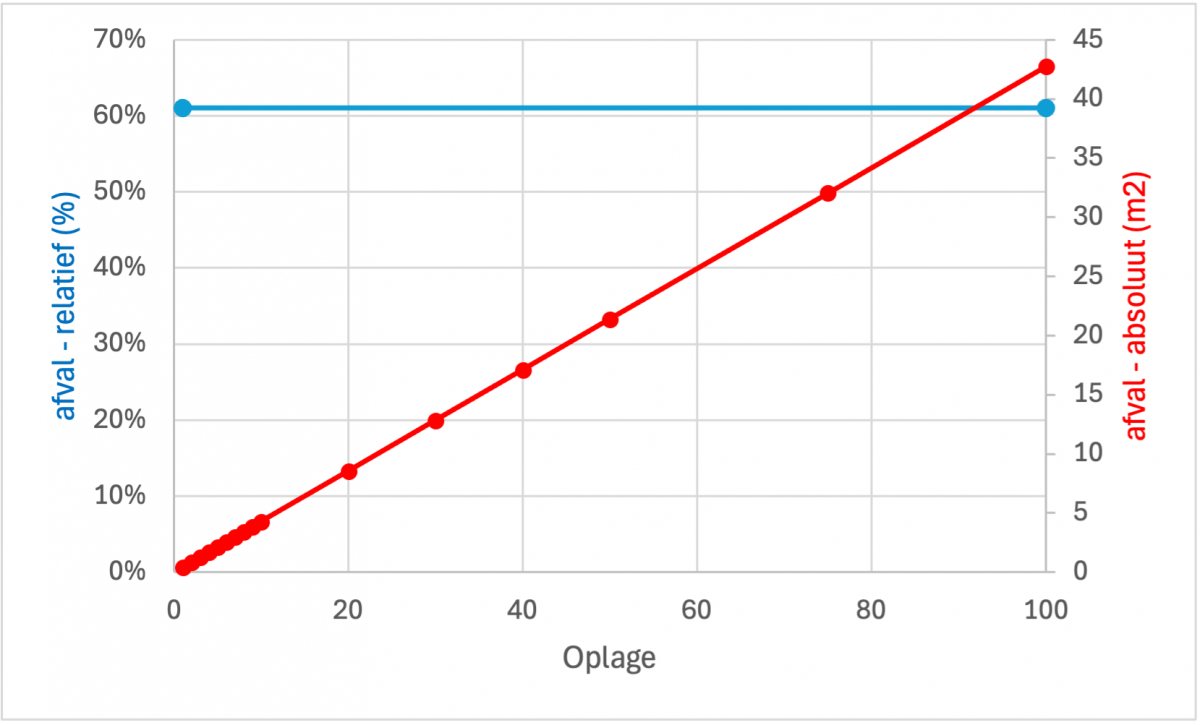
Relative waste (%) and total waste (m²) for the Illustrator text layout. The waste percentage remains constant at 61%, regardless of production volume, with each sheet generating 0.427 m² of waste. As production volume increases, the total amount of waste grows proportionally with the number of sheets printed.

The relative waste percentage fluctuates at low production volumes (1 to 10 sheets), as an additional sheet may or may not be required. As volume increases, these fluctuations level off and the waste percentage stabilizes at around 40%.
Although the total amount of waste (m²) still increases with volume, it grows much more slowly than with a standard Illustrator layout. The higher the production volume, the greater the optimization potential and the resulting material savings.
Conclusion
Na de heetste zomer sinds het begin van de weermetingen is het voor iedereen duidelijk dat CO₂-uitstoot geen fictief begrip is maar prioritair voor de largeformat-printer. Veelvoorkomende opmerking is dat klimaatactie geld kost en de concurrentiekracht aantast. Onze verkennende testen tonen aan dat je zowel budgettair als klimaatgericht winst kan boeken. Aan de implementatie van optimalisatie-software hangt een prijskaartje vast maar je krijgt er efficiënt substraatgebruik voor terug: minder kost en lagere uitstoot! Vooral voor complexere opdrachten (free nesting) behoort een 50% reductie in kost en uitstoot tot de mogelijkheden. Voorwaarde is dat je voldoende volume hebt: hoe meer printjobs je kan combineren, hoe meer winst in efficiënt substraatgebruik. Dit werd ook bevestigd tijdens een bezoek aan largeformat -printers: aan snelle uitlevering hangt een prijskaart, is er meer tijd voorhanden dan is er meer ruimte tot optimalisatie en lagere kostprijs.
